
I've submitted my Draft Scope. What's next?
Step 1. StudioSpace will review the Draft Scope
Once you've submitted your Draft Scope, StudioSpace will review the content. If we have any feedback for you, you'll be notified via email. Simply go back into the Draft Scope and find the sections marked "Changes requested" as shown below.
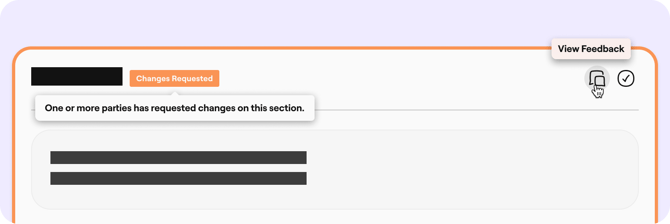
If you click on "View Feedback", a panel will appear to the right-hand side with details of what's required.

Once you have made the necessary changes, resolve the feedback by using the "Mark as Actioned" button. This will allow you to mark the section as complete.
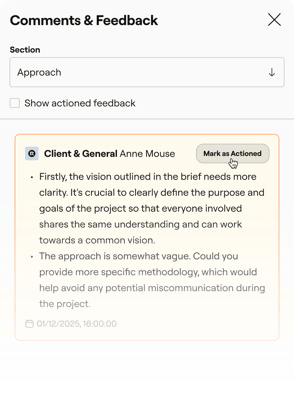
Mark these sections as complete, and you'll be able to submit the Draft SoW for review once more. Otherwise, if all the content has been approved by us, the Draft SoW will be sent to the client for review.
Step 2. The brand will review the Draft Scope
If your brand has any feedback for you, you'll be notified via email. Follow the same instructions in step 1. Once you mark these sections as complete, you'll be able to submit the Draft Scope for review once more. Otherwise, if all the content has been approved by the brand, StudioSpace will look over all documents one last time.
Step 3. The final SoW gets signed
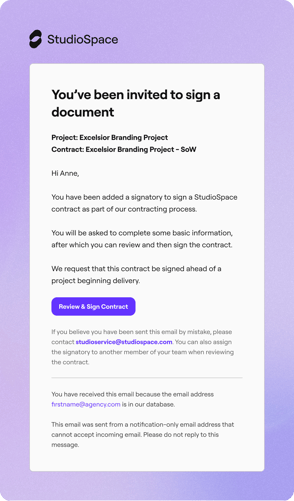
StudioSpace will send you an email asking you to sign the contract. An email (similar to the one below) should appear in your inbox.
You'll be able to view your contract and its status via the Statement of Work tab in your the contracting stage.
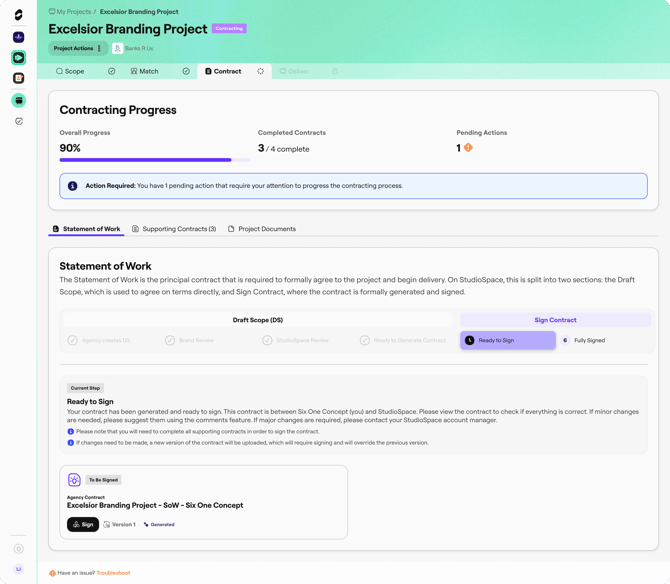
Once you review and sign the document, you will be able to download this Statement of Work via the contract interface.