
Head to Marketplace > Your Profile, and in the blue notification, click "Submit Client Testimonial". This will take you to a submission form.
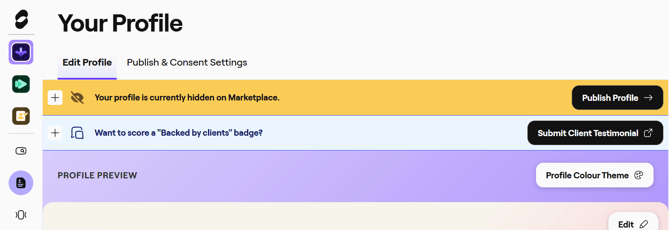
Fill out the form fields, including the your client's details. Once submitted, your client will be contacted by our head of agency to either submit a new testimonial, or verify an existing one you have submitted on their behalf.
If for whatever reason, your client isn't getting the testimonial emails from us, please share this link directly with them to provide the required information.
We do not publicly share any personal information such as the testimonial provider's first and last name. We only share the job title of the testimonial provider and provide the client with the option on whether they'd like to share their company name or keep it undisclosed.
Note: If after two weeks, we haven't had a response from your client, you'll be contacted by our head of agency to follow up with them.
We do not immediately publish testimonials, but do a regular review and mass publish to ensure no confidential information is shared. So if your testimonial is not showing on your page, rest assured it will be published at the next possible opportunity.
When your testimonial will be published live to your agency profile
For agencies that have a live and published profile, testimonials will be updated onto your profile on a daily basis.
For agencies that are just onboarding to StudioSpace and require a testimonial to be approved onto the Marketplace, testimonials are manually reviewed for quality control, so we will batch publish testimonials on a regular monthly basis.